
Wi-Fi hotspots are a convenient way to get online when you’re out and about. They can be found in public places such as airports, cafes, and libraries, or you can set one up with a mobile Wi-Fi hotspot. And the mobile Wi-Fi hotspot in your pocket is always better than searching for a network you can connect to when out and about.
The best Wi-Fi hotspots are also small, unobtrusive devices with long battery lives. This allows users to use them all day without recharge, potentially making them a great device for people always on the go. There are a few different types of mobile Wi-Fi hotspots. Some look like small USB drives that plug into your laptop, while others look like miniature routers you can carry in your pocket.
The best Wi-Fi hotspots come with 5GHz support that cuts through interference. This means you can stay connected even when many people are trying to access the same wireless network. This is especially important in urban areas where many people use Wi-Fi extenders.
Top 10 Best Wi-Fi Hotspots Reviews:
The following are reviews of the top 10 best Wi-Fi hotspot devices for uninterrupted internet connectivity on the go.
1. Inseego 5G MiFi M2000 Wi-Fi Hotspot Review
The Inseego 5G MiFi M2000 is among the best mobile hotspots on the market, and it works with various carriers. It’s appealing to T-Mobile consumers since it supports both the Sub6 (low-band) and mid-band 5G networks, so you’re only lacking out on mmWave’s range limitations.
The 2.4-inch color touchscreen on this Wi-Fi hotspot allows you to navigate and link up to 30 Wi-Fi-enabled devices. In a hurry, you can use the hotspot’s big battery to charge your phone, as it can also function as a portable battery pack.
Data Plans: Starting at $10 per month for 2GB of 5G data, additional data plans include 5GB for $20, 10GB for $30, 30GB for $40, and 50GB for $50. These plans are pretty affordable, and if you are using less than 5GB of data through a hotspot, you may be better off just using your phone for occasional connections.
Specifications of Inseego 5G MiFi M2000 Wi-Fi Hotspot
- Connectivity: 5G (sub-6 and mid-band); 4G LTE
- WiFi Version: 801.11 b/g/n/ax WiFi 6
- The capacity of the battery: 5050 mAh
- The battery lasts for a full day of use
- Dimensions: 150 x 70 x 17.9mm
- It weighs 210 grams

Buy: INSEEGO M2000 5G MIFI at $348.99
2. Netgear Nighthawk MR1100 Wi-Fi Hotspot Review
The Nighthawk MR5100 5G hotspot from Netgear is widely regarded as one of the best in the industry. With its 2.4-inch color screen and 320×240 pixel resolution for browsing, this mobile hotspot can connect up to 32 WiFi-enabled devices. Your existing home router can link this mobile hotspot to your existing home network so you can enjoy 5G speeds in the comfort of your home and extend the capabilities of all your AT&T devices.
Data Plans: You can pick between two tiers if you aren’t an AT&T client and want a dedicated mobile hotspot account. For $75 per month, you can have 40GB of high-speed data; for $50, you can get 25GB. For every 2GB over your plan’s data limit, you’ll be charged $10 in overage fees.
Prepaid data plans are also available through AT&T, with 15GB for $35 per month and an extra 5GB for $10. A 100GB plan is also available for $55 per month, so if you use a lot of data, a prepaid plan is more cost-effective than a postpaid plan.
Specifications of Netgear Nighthawk MR1100
- 4G LTE wireless network connectivity
- WiFi Version: 801.11 b/g/n/ac/ax WiFi 6
- The battery has a capacity of 5040 mAh
- Up to 8 hours of battery life
- Dimensions: 105 x 105 x 21.5mm
- A weight of 240 grams

Buy: Netgear Nighthawk MR1100 at $199.99
3. Inseego MiFi M2100 5G UW Wi-Fi Hotspot Review
The Inseego MiFi M2100 5G UW is comparable to the T-Mobile MiFi M2100 5G UW; however, it works with Verizon’s fast mmWave 5G high-band service. It also comes with a tiny yet replaceable battery, so you may take spares and use it as a mobile hotspot for as long as you need it. So you can rely on your mobile connection; it supports WPA 3 WiFi security with hacker suppression features and authentication mechanisms.
The 2.4-inch color touchscreen on this mobile hotspot allows you to navigate and link up to 30 WiFi-enabled devices. You can use the hotspot’s battery to charge your phone in an emergency because it can function as a portable power pack.
You don’t need a Verizon account to purchase this hotspot and activate the service. Verizon offers unlimited 5G Ultra-Wideband (mmWave) connectivity for $85 and 30GB of 5G Nationwide (Sub6) or 4G LTE bandwidth. Unless you connect over the Ultra Wideband network, your unlimited internet reverts to 600 Internet Speed once you reach the 30GB restriction. Unlimited Plus is the name of this service plan.
Verizon also offers the Unlimited Plan, which includes 5G Nationwide or 4G LTE connectivity at full speeds for 15GB of data but does not include 5G Ultra Wideband network coverage. Access rates are limited to 600 Kbps after that.
Specifications of Inseego MiFi M2000 5G UW Wi-Fi Hotspot
- Various network connectivity options (Sub6 and mmWave) and 4G LTE
- WiFi Version: 801.11 b/g/n/ax WiFi 6
- Removable 3500 mAh battery
- The battery lasts for a full day of use
- Dimensions: 150 x 70 x 17.9mm
- It weighs 210 grams

Buy: Inseego MiFi M2100 5G at $349.99
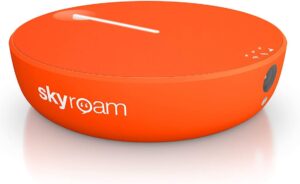
4. Skyroam Solis Lite Wi-Fi Hotspot Review
Although all three main US carriers support 5G, there are instances when you need 4G LTE connectivity that goes beyond what your smartphone can deliver. The Skyroam Solis Lite is a worldwide mobile hotspot that can connect to the internet in over 130 internet
The bright orange hotspot is small and portable, with a height of about one inch and a weight of 139 grams. Up to ten devices can access your connection, and the battery lasts more than 18 hours.
Data Plan: Skyroam has three plans: Unlimited Data, GoData, and Global Day Pass. The Unlimited Data package includes up to 20GB of 4G LTE data, followed by 512 Kbps. This plan’s global option is $99 per month, with three- and six-month plans available for a lower monthly cost. For $49 a month, you can get unlimited data in the United States; for the same price, you can get unlimited data in the EU. If you need more 4G LTE data, Skyroam also provides top-up pricing, ranging from $15 for 5GB to $75 for 50 GB.
The Go-Data plan starts at $9 monthly for 1GB of data; you pay for what you use. When the 30-day period ends, the data restrictions that you purchased are not transferred. Another service choice is the Global Daypass, which offers unlimited data for 24 hours for $9.
Specifications of Skyroam Solis Lite Wi-Fi Hotspot
- Connections: 5G (Sub6 and mmWave) and 4G LTE
- Wireless Version: 801.11 b/g/n/ax WiFi 6
- 6000 mAh battery capacity
- More than 18 hours of battery life
- Dimensions: 89mm diameter x 23mm height
- It weighs 139 grams
Buy: Skyroam Solis Lite Wi-Fi at $127.99
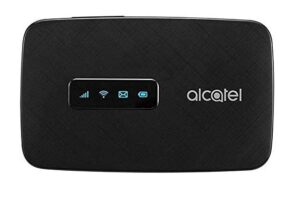
5. Alcatel LINKZONE 2 Wi-Fi Hotspot Review
The Alcatel LINKZONE 2 is a low-cost mobile hotspot connecting up to 16 devices to 4G LTE. It’s rather simple, but it has a massive battery that should easily last a full day of use.
In an emergency, you may use the big battery of this hotspot to charge your phone, camera, tablet, or another device by using it as a mobile battery pack.
Data Plan: The cheapest data plan for 5G data is $10 per month for 2GB, with options for more data, including $20 for 5GB, $30 for 10GB, $40 for 30GB, and $50 for 50 GB. Considering these are fairly affordable plans, you may be better off using your phone for occasional communication if you use 5GB or less of data through a hotspot.
Specifications of Alcatel LINKZONE 2 Wi-Fi Hotspot
- 4G LTE network connectivity
- WiFi Version: 801.11 b/g/n/ac
- Removable 4400 mAh battery
- The battery lasts for a full day of use
- Dimensions: 105 x 66 x 19mm
- It weighs 146 grams
Buy: Alcatel LINKZONE 2 Wi-Fi at $66.99
6. Netgear Nighthawk LTE Mobile Wi-Fi Hotspot Router Review
Providing mobile internet access for up to 20 devices, the Netgear Nighthawk LTE Mobile Hotspot Router is a mobile hotspot with 4G LTE connectivity. As a backup device, it has internal storage and a microSD card slot to store your data.
The Netgear Nighthawk comes with a 1.4-inch display with 320×240 pixels of resolution. You can use the hotspot to charge your phone using JumpBoost via a smartphone app. Two TS-9 ports can be used for optional 4G antennas as well.
Data Plan: Two tiers of accounts are available for not AT&T customers. The monthly cost for 40GB of high-speed data is $75, while the monthly fee for 25GB is $50. Overage charges are $10 for every 2GB over your plan’s data limit.
In addition, AT&T offers prepaid data plans with 15GB for $35 per month and another 5GB for $10. Additionally, you can choose a 100GB plan for $55 per month, making prepaid plans more affordable than postpaid plans if you use a lot of data.
Specifications of Netgear Nighthawk LTE Mobile Wi-Fi Hotspot Router
- 4G LTE network connectivity
- WiFi Version: 801.11 b/g/n/ac
- 5040 mAh battery capacity
- The battery lasts for a full day of use
- Dimensions: 105 x 105 x 19mm
- 241 grams in weight

Buy: Netgear Nighthawk LTE Mobile Wi-Fi at $266.84
7. The Jetpack 8800L Wi-Fi Hotspot Review
The Jetpack 8800L is the sequel to Verizon’s Novatel Jetpack MiFi 7730L, which The Wirecutter previously ranked as the best hotspot. The 8800L is equipped with a new Qualcomm modem that can combine signals from up to five carriers, ensuring a strong connection no matter where you are. It also supports a wide range of LTE bands and UMTS 3G.
The Jetpack 880L complies with Verizon’s network and can handle worldwide roaming while supporting up to 15 Wi-Fi-enabled devices, including laptops.
Specifications of The Jetpack 8800L Wi-Fi Hotspot
- Touchscreen with a size of 2.4 inches
- Wireless connectivity: 802.11 a/b/g/n/ac, LTE
- Up to 24 hours of battery life
- Size: 4.3 x 2.6 x 0.7 inches
- It weighs 5.4 ounces

Buy:The Jetpack 8800L Wi-Fi Hotspot at $106.69
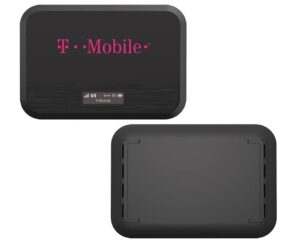
8. Franklin T9 Mobile Wi-Fi Hotspot Review
Franklin T9 Mobile Hotspot lets customers stay connected no matter where they are. It can connect 15 devices simultaneously at LTE speeds and with multi-band support. However, this hotspot cannot connect to T-Mobile’s 5G network nationwide.
It weighs just 2.63 ounces, making it a very compact mobile hotspot. Additionally, the OLED display is tiny but large enough to show device statuses but not much else. With the 2,450 mAh battery, you can enjoy 48 hours of standby time and 8 hours of continuous use.
Specifications of Franklin T9 Mobile Hotspot
- OLED screen, 0.9 inches
- Wireless connectivity: 802.11 a/b/g/n/ac, LTE
- Up to 48 hours of standby time is rated for the battery
- Size: 4.1 x 2.6 x 0.5 inches
- It weighs 2.63 ounces
Buy: Franklin T9 Mobile Wi-Fi Hotspot at $20.99
9. RoamWiFi R10 4G Portable WiFi Device Review
Regarding battery life, the RoamWiFi R10 4G Portable WiFi Device exceeds its hotspot competitors, providing up to 18 hours of uninterrupted internet surfing. Up to five devices may access its RoamWiFi R10 Wi-Fi, which supports 1GB of global data in 160 countries and regions.
The hotspot offers an upload speed of 50 Mbps and a download speed of 433 Mbps, which means it can handle all your needs. The default Wi-Fi frequency band is 2.4 GHz but can be increased to five GHz for higher connection speeds.

Buy: RoamWiFi R10 4G Portable WiFi at $159.99
Buying Guide for Wi-Fi Hotspots
The following points should be kept in mind while buying Wi-Fi hotspots:
- Look for an Unlocked Device: One of the most important factors is whether the device is locked to a particular service provider. Cheap devices will likely be locked to a specific service provider, so be aware if you buy a device for a low price. Using a locked device with any other service provider is impossible. It is strongly recommended you buy an unlocked Pocket WiFi Router if you are going to invest your money in one. This will allow you to switch providers if you so desire.
- Check the Data Plans Offered by the Provider: Look at the internet service provider’s data plans before you buy a locked device. How many prepaid and postpaid plans do they offer? Do their plans come at a high price? You may be provided an extremely cheap device, but if you accept the contract, you will be tied to their expensive data plans.
- Ability to Connect Multiple Devices At Once: Check the number of devices connected to the router. Many devices allow five connections, which seems like a reasonable amount. You should use devices that provide more connections if you have a larger family or plan to use them for a small office.
- Check if it is Compatible With Your Service Provider: Think about what kind of service provider you will primarily use. Not all providers offer coverage everywhere. Some routers won’t work with all service providers. Check if your SIM card, USB data card, and service provider are compatible with your portable WiFi hotspot device.
- Look for a Device That Comes With USB & A/c Power: In addition to USB power, many portable WiFi routers can be powered directly from AC and via USB. You should buy a device with USB and AC power inputs to use it anywhere and not have to hook it up to your computer.
How to Make the Most of Mobile Hotspots?
When using a mobile hotspot to access the Internet, it’s critical to protect your mobile data responsibly. When at all possible, avoid watching videos on the Internet. Videos consume so much bandwidth that they will quickly deplete your mobile data, leaving you without service or incurring unexpected costs. If your browser’s speed is too slow, try utilizing compressing software. Switch off graphics in your browser to increase the speed and save your data even more.
Conclusion
Wi-Fi hotspot devices are useful for individuals who want to enjoy net connectivity on the go. We have presented you with the top 10 best Wi-Fi hotspot device reviews and a comprehensive buying guide for purchasing Wi-Fi hotspot devices. Users interested in buying Wi-Fi hotspot devices must thoroughly review these reviews before making any purchase.
