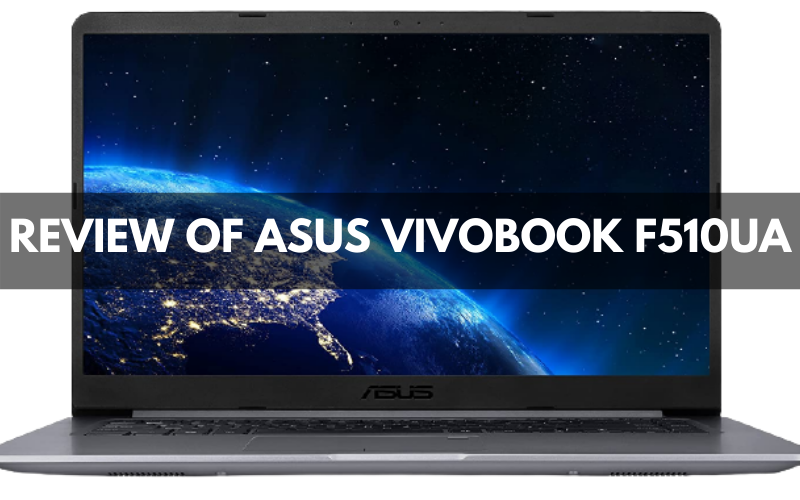
Looking for a high-featured laptop at an affordable price? Then you have landed on the right page. By considering all the important factors that are extremely important in a laptop. Thus, we have found the Asus VivoBook for you. It is the perfect combination of performance and features. Also, with an updated version of windows, you can easily use them. Moreover, in this price range. They are one of those systems that don’t stick or jam while using. Making them perfect for long-time users. Along with that, you can even run heavy editing software’s in them.
It comes with a 15.6 Full HD display. Talking about the design, this Vivobook resembles almost like the higher generation systems. Let us give you a glimpse of the processor capability. Inside, it has a core-i5 system along with the 8GB ram. The fun part is, you can even use them in bed. At the same time, on a Laptop Holder. Also, with the powerful fans fitted in them. It keeps the system cool and running, for a long time. In the market, there are some other brands. Yet, they have many issues with their product as some come at a very lower price. Thus, they lack so much while performing.
I highly assure you; this is the top product present in the market nowadays. In this article, I am going to elaborate on every specification of this Asus laptop completely. So, let’s check it out then;
Asus Vivobook F510UA:

Overview:
It isn’t easy to find 15-inch screen laptops in a good price range. However, after finding a good laptop, there only comes possibilities. Firstly, they have an 11–12-inch screen. Secondly, their performance is not like that as they have written in the description. That’s where the Asus VivoBook F510UA comes in. This laptop is a rare breed.
Along with the 15.6-inch screen, it has an attractive design. Moreover, it has an 8-generation piece of technology. Yet, it is available at the price of 599$. This is the closest to the budget, with all the advanced features in it.
Unique Design: Unlike the other brands, Asus doesn’t give a clumsy look to their prototypes, as you have often seen in the Dell and Acer stodgy laptop. Asus VivoBook F510UA has a thin body, which gives it a unique modern look. The back end is covered with gunmetal blue color. However, in this budget, it is impossible to get an aluminum chassis. The plastic ensures it is not only thin but also fairly rigid. The vibrant lid shows it as a lenticular lens.
Pricing: To look at the costs, let me show it with a comparison. Acer Aspire E 15 is available at 699$. But when we consider the specification. Asus laptop is much lighter and slimmer than the Acer Aspire E 15. As Asus follows the technology trends, therefore, removing the CD drive permanently from the system. Making it only 0.8 in profile. So, why not buy that laptop which is more superior in features.

Keyboard: While using the spacious keyboard, you will not face any issues. Unlike the cheap boards, it doesn’t make any noise while typing rapidly. This keyboard flexes a bit from the midst during use. Unfortunately, it lacks a backlighting feature. However, this mode is rarely happening to be seen in the budget laptop.
The touchpad is smartly designed. Thus, it might look a bit undersized at the start. You can also use the fingerprint security feature, which sits at the touchpad’s top left side. Many budget laptops support wide bezel screens, which makes the content look smaller. However, this is not the case in Asus Vivobook F510UA. In this laptop, the bezels here are slimmer. They are allowing the full display in the 15.6 elegant frames.
USB Accessibility: Asus laptop produces a crispy texture, yet it lacks a touch screen. However, it helps a lot! in keeping the glares and reflections at bay. There are both types of USB ports available on this laptop. Thus, with the type A and Type C ports availability, you can easily connect your devices with the Asus. Making it free from any dongle. Also, you will find two USB type A 3.0 ports along with an SD card slot. On the other side, it has a Type-A 3.0 port and a Type-C port. Besides, it has an HDMI port, a combo headphone/mic job, and a power connector.
System Specification: Let’s explore first what’s lie inside this laptop. Asus VivoBook is an 8th Generation laptop CPU. F510UA has 8G of RAM, and 1TB hard drive, which gives a smooth performance while using the laptop. Moreover, Asus integrated intel UHD graphics 620 makes sure to provide a better gaming experience. Also, it has four processing cores and eight processing threads. They operate between a base frequency of 1.6GHZ and an ultra turbo frequency of 3.4GHZ. So, you can easily enjoy multitasking between different apps, snapping different tabs one by one.
These are just a glance at some top features. In the below passages, you will know what things this laptop can do.

Buying Guide
Let’s discuss some factors, which you must consider while buying a budget laptop. Therefore, they will work for you in the long run as these things come with a price. So, it’s not a bad thing to do a little bit of research before going shopping.
Pick the Suitable Platform: While buying a budget laptop, see what’s the supportable platform for the technology. These platforms include macOS, Chrome OS, and Windows OS. These are the most advanced in the market. However, using chrome and mac OS is difficult for most beginners. While on the other hand, windows are the most used operating system in the world. They are much easier to use than the other platforms. Making them the most demanding in the market than the other competitors.
Design and Size: These laptops come in a lot of sizes and designs. Therefore, it is important to pick the most suitable one according to your needs. The 11–12-inch laptops are the smallest and have a simple design. After that comes the 13-14 inches laptops. They are perfect for portability and mobility. 15-16 inches are the most common and come with a sleek design. You can get them in the top generations as they didn’t cost that much. They are considered the best replacement for desktops. However, to play high-performance games, you can select a 17-18 inches system. Yet, it isn’t easy to carry them. Along with the high processing capability, they are also heavy. Therefore, it is best to use them along with a Respawn Gaming Chair.
Check the Specifications: To meet the requirements. you are looking in a laptop. Make sure to check the requirements first. Check the core generation. With better performance, you will perform tasks more smoothly. Ram is also important; otherwise, your system will lack a lot. For storing data, files, and other kinds of stuff. At least consider 500GB of storage. If you want to enjoy a better gaming experience, graphic cards’ availability is crucial in the system. Similarly, check other specs like resolution and keypad sensitivity. Therefore, when you start your journey, you will know what the given requirements for that are.
Ports: For transferring different kinds of data, it is important to have the presence of ports. Otherwise, the laptop will not be of great use. The system you are investing in must at least have USB ports. It will be great if they have both type A and C USB slots. Furthermore, HDML is also required to connect with an additional screen. Must remember this tip, as it will help you a lot in lessening the workload.
FAQs
How much money should be considered for buying a Budget laptop?
You must at least have the 500-650$ budget. You will easily get a laptop in this range, however, if you think about buying a little cheaper system. They will lack in a lot of specification. Therefore, I will recommend you to shoot for a 550$ laptop. You will get a remote system with at least 500GB + hard drive and other Specs.
How do I choose a good laptop?
Before buying:
Consider few factors like size and design.
- Don’t go for a heavy-weight system as this will cause a lot of trouble.
- Check the generation.
- At least, go for more than a 5th generation as they are slim and are few pounds in weight.
- Check the ram and hard drive capability.
How much Ram is needed for a laptop?
To run the system properly. At best, 4GB ram is sufficient. It will perform perfectly for routine work. Also, it will run few high-graphics games along with the Graphic card. To improve the performance, you can increase the ram up to 8GB.
